Skip to content
Equipment maintenance · Top Quality

Every machine counts its own hours and asks for its service.

When a service comes due, the platform puts the job on the list without anyone asking it to. The technician gets the steps on the shop-floor terminal and leaves behind a photo, a reading and a signature. At the end of the month you see what each machine cost you — parts and labour together.

40%
of unexpected downtime can be avoided if the service is done on time
6
kinds of proof you can require on a step: photo, tick, reading, signature, minimum time, maximum time
5 years
ahead you can see what each machine will cost you
01What the platform does

See what each machine actually costs you.

The platform counts operating hours, keeps track of the parts used and stores every step performed. Out of that comes the full cost of maintenance — parts, labour and downtime — per machine and per month. The plan stays yours, and the platform works without the rest of Top Quality.

What you get

  • The plan belongs to the company. The person who kept it in their head leaves; the plan stays.
  • A service falls due after however many days you set since the last one, or after however many hours the machine has run.
  • Every step has a written instruction and a reference photo, and the procedure remembers its versions.
  • Every part used stays tied to the job and to the machine it went into.
  • A step cannot be closed without what you asked for: a photo, a reading within limits, or a signature.
  • See parts and labour per machine, for whatever month or year you pick.
02Three situations

The same platform, used in three ways.

It matters where you stand in relation to the machine: you run it every day, you repair it for someone else, or you built it and sold it. Each situation gets different features and its own calculator.

01

Factories and warehouses

You own your machines and you lose output at every unexpected stoppage.

  • Services schedule themselves, on the hours actually run
  • The technician works on a terminal, on the floor, and leaves the proof
  • See what maintenance cost you, machine by machine
02

Maintenance service companies

You have several customers and you want to know what their machines are doing without driving out.

  • Every customer's machines, on a single screen
  • See what the machine needs before you send anyone out
  • Hours worked add up for the invoice as the work happens
03

Machine manufacturers

You have sold machines and you want to know how they are being looked after.

  • See the condition of the machines you have sold
  • Step in before the failure and pay less on warranty
  • Sell service contracts and parts from data, not from guesswork
03What it contains

Five things, from the machine's record sheet to next year's budget.

01

A record sheet for every machine

The sheet holds everything you need about the machine: internal code, manufacturer, model, serial number, the year it was built, the hall it stands in, how critical it is, how many hours it has run, how many cycles it has done and whether it is running now. The manuals and the QR code stuck on the machine live there too.

02

The procedure, written once

You write the procedure a single time, as a chain of steps that call one another. On each step you choose what the technician has to leave behind: a photo, a tick on a list, a reading within limits, a signature, a minimum time or a maximum time. Procedures are never deleted — you take them out of use and they stay in the archive.

03

Services that ask for themselves

For each machine you set the rule once: after how many days since the last service, or after how many hours run. After every job the platform recalculates and puts the next one on the list by itself. Nobody has to remember dates any more.

04

The work on the floor

The technician signs in, scans the code on the machine and gets the procedure step by step on the terminal. The platform measures how long each step took, parts leave stock tied to the job, and the photos and readings stay in the machine's history.

05

What you have to spend

From the services coming up and what has been used so far, the platform shows you the jobs and materials due over the period you choose — for one machine or for the whole fleet. The parts to buy become a list you have in advance, not a problem on the day the machine stops.

Calculate what your current situation costs.

Schedule a discussion
04Flexible purchase

Pay the way that suits you, not the way that suits us.

The same features in all three. Only the way you pay changes — and you pick it, based on how the money looks in your company, not on how we would prefer to collect it.

Once and done

One-off payment

You pay once and the licence is yours. Nothing compulsory each month, implementation included. You use it for as long as you like, without depending on us to keep it running.

Fits whenYou have the money now and want no monthly cost at all.

No limits

Annual subscription

A constant annual cost, with no limit on machines, users or sites. Updates and support are part of it, for the whole term.

Fits whenThe fleet grows fast and you want a constant annual cost, however many machines you add.

Per machine

Monthly subscription

You pay monthly, in proportion to your machines and to the people actually working in the platform. The price per machine falls as you grow.

Fits whenYou start small and pay in proportion to the machines and to the people in the platform.

You will not find prices on this page, and that is a choice: the figure depends on how many machines go into the register, how many people work in the platform and how many sites you have, and a list price would be either wrong for most people or so wide it says nothing. We work out your configuration in the first conversation and put it in writing, as a sum, not a range. You can move from one model to another after implementation too.

05Predictive maintenance

Repair before it breaks, not after.

Preventive maintenance runs on fixed rules: so many days or so many hours. The predictive kind looks at what the machine has done so far and at what it reads off it, then shows you which machine is starting to behave differently from usual — while it is still running.

How it works
01

Reactive

The starting point

You go to the machine after it has stopped. You pay for the lost output, for the part bought at the last minute and, often, for the extra damage done by a machine that kept running faulty.

02

Preventive

Available from day one

You go to the machine when the service comes due, counted in days or in hours actually run. Unexpected stoppages drop, and the job is placed when stopping costs least.

03

Predictive

As history builds up

How often a service happens is fitted to the state observed: the readings off the machine, how long each job took, the measurements from the procedures and the parts used. Machines that start behaving differently from usual are flagged before they break.

05A case from our portfolio

A customer was reporting services that had never happened.

On paper, maintenance was done regularly. We looked at consumption: the parts those services needed had never been bought. The jobs had not taken place. Without a digital record, something like that can go unnoticed for years, while the machines wear out far faster.

That is why you can require a photo, a reading, a signature or a minimum time on every step: so a job cannot be ticked off as done if it was not done.

06Overview

One screen that answers “where do we stand”.

The screenshots that follow come from the running application, with the data of one factory: 28 machines, 42 published procedures, 121 maintenance orders. None of them is a mock-up. The interface shown is the Romanian one.

The maintenance dashboard, with four counters on the first row — 32 open jobs, 7 in progress, an average resolution time of 3.5, and 4 completed today. Below them, a chart of technician workload, the distribution by priority and the rate of compliance with procedures; at the bottom of the page, the list of overdue jobs with machine and due date, next to the equipment that is stopped right now.
The first screen after signing in. Not a general dashboard with a filter applied, but the panel of the maintenance subsystem: open jobs, average resolution time, team workload, compliance with procedures, what has fallen behind and which machine is standing still.
The order board, with cards grouped into four columns: Planned 8, Assigned 4, In progress 3, Completed 15. Each card carries the order number, the name of the job, the technician assigned, the estimated duration and a deadline label — “37 days late”, “Due today”, “In 3 days”.
The maintenance manager's daily working screen. You move the cards from one column to another with the mouse, and the deadline label says without any arithmetic what has gone past its date.
07The fleet

The whole fleet, with the services in plain sight.

Every machine has a record, and its maintenance plan hangs off that record.

The equipment list, with columns for internal code, name, manufacturer and model, type, state and maintenance due date. Rows that are in order show a dash in the due-date column; two of them instead carry a red label, “4 days late” and “15 days late”. Above the table, the search field for code, name, model or manufacturer.
The whole fleet — 28 machines — and at a glance, what has fallen behind.
The record of the machine “5-axis CNC machining centre”, internal code TQ-CNC-001: the plant and the hall it stands in, type fixed, state active, serial number DMG-2022-533, manufacturer DMG Mori, model DMU 50, year of manufacture 2022. Along the top, the tabs Details, Procedures, Capabilities, Forecast, History, IoT and Live sensors.
The machine's identity card. Everything that follows — procedures, services, jobs, costs — hangs off this sheet.
The Procedures tab of the same machine, with two entries: the monthly and the six-monthly service for the 5-axis CNC centre, both of preventive type, criticality A, state “Published”.
This is where the machine gets a maintenance plan.
08The procedure

The written procedure, not somebody's memory.

What gets done, in what order, with which materials and with which safety warnings. Write it once, use it at every job.

The list of maintenance procedures, with name, type — preventive or statutory —, state “Published”, criticality (A critical, B major, C minor) and whether the procedure is active. Among the rows, “Annual statutory inspection, diesel forklift”, “Two-monthly service, screw compressor” and “Monthly service, coating robot”.
The factory's library of procedures: 42 published — preventive, statutory (ISCIR), predictive and calibration.
The header of the procedure “Two-monthly service, screw compressor”: preventive type, criticality A, the machine 45 kW screw compressor (TQ-COM-016), the description of the job, a scheduling tolerance of 5 days and the qualification required. On the right, the state “Published”, the starting step “Shut down and depressurise” and the Archive and Clone buttons.
A procedure is a living, versioned document: it is not deleted, it is withdrawn from use, and a new one starts from a copy of the old.
The Steps tab of the same procedure, with its six steps in order — shut down and depressurise, replace the air filter, check the oil and the oil filter, inspect the drive belts, test the safety valves, check the condensate drain. The selected step shows its description, the safety-notes field, the “Mandatory” marker and the two planned materials: ISO VG 68 compressor oil and a compressor oil filter.
This is where it shows that it is not a tick list but a written procedure, with the material planned on each step.
09Automation

Services schedule themselves.

The rules put the jobs out on time. The predictions show you what is coming on each machine and what material to buy before then.

The list of maintenance triggers: the procedure, the machine, the date and time it falls due, the interval — annual, quarterly, monthly, every 60 days, every 6 months — and the state. Almost every row reads “Pending”, on yellow; one reads “Due”, on red.
The rules by which the system schedules the work on its own. Nobody has to remember when the next service is.
The Forecast tab of the 5-axis CNC machining centre, over the range 30 August to 28 November 2026, chosen from the calendar or from the quick buttons for 30, 60 and 90 days. Three monthly services are foreseen, each with its date, procedure, preventive type and the source “Estimated”. Next to it, the tabs Materials required and Material cost.
What is coming on the machine, with the purchasing requirement and the cost prepared in advance rather than at the moment of the breakdown.
10Execution

What was consumed, and what stays on the record.

Materials come from the ERP catalogue and stay tied to the job and to the machine. A finished job goes into the machine's history, together with the procedure it was worked to.

The material catalogue, with code, name, material type, unit of measure, base quantity and state: industrial cleaning solvent, paint-booth filter, traction battery cell, 6205-2RS bearing, SPZ 1600 V-belt, NBR O-ring set. Above the table, the barcode scanning field.
Maintenance materials live in the ERP catalogue, not in a separate list. The purchase price recorded there is what produces the cost figures on every job — maintenance and stock are not two systems.
The History tab of the 5-axis CNC machining centre: the completed jobs, each with its order number, the procedure it was performed under, the scheduled date, the completion date, the state “Completed” and the priority.
What was done stays written down. Every job keeps the procedure it was worked to and the day it was closed.
11Partners

We do not arrive at your shop floor alone.

Software on its own cannot read a machine, and it cannot reach one over the network. For the devices and for the link we work with two partners who answer for what they deliver.

Honeywell

Honeywell

Professional devices, built into the platform

We are a Honeywell partner for building professional devices into the companies we digitise. Their terminals, scanners and printers go straight into the platform. The person on the shop floor scans a code and confirms the step, with no keyboard and no paper. The identification and labelling line carries on under Brady.

Vodafone Romania

Vodafone Romania

IoT connectivity and financing for the project

Machines and work sites send their data over the Vodafone network. Vodafone also finances the rollout — devices, connectivity, labour and licences, shaped to the project.

12Honeywell devices

The devices that end up on your shop floor.

We pick the right model for each work point. The figures below come from the official Honeywell data sheets, so you can compare before you buy rather than after.

Handheld computers and tablets

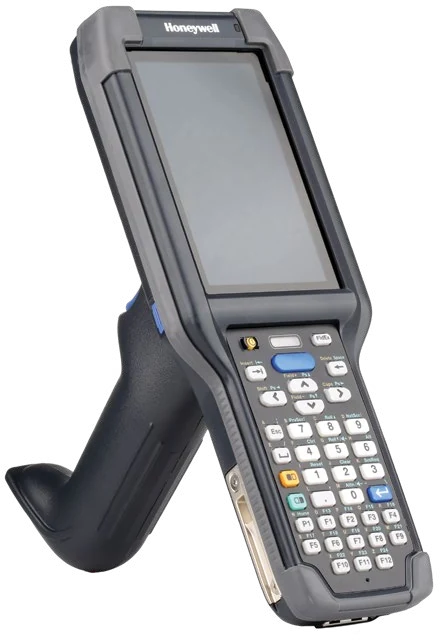
Handheld computer for the worker who moves all shift

CT45 / CT45 XP

Handheld computer for the worker who moves all shift

5.0 in display, Full HD on the XP
Repeated 1.8 m drops to concrete
IP68 and IP65 sealed
282 g with battery
Warehouse terminal with a physical keypad

CK65

Warehouse terminal with a physical keypad

7,000 mAh battery, 28 hours continuous
3 m drops to concrete
3,000 tumbles from 1 m
IP65 and IP68 sealed
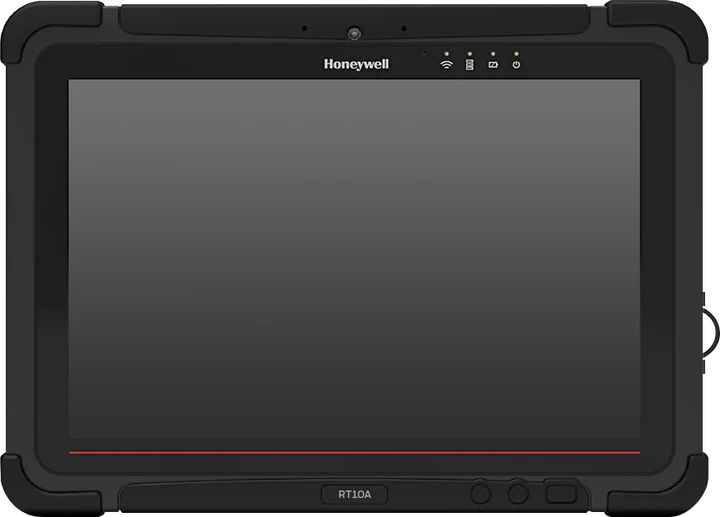
A 10-inch tablet, mounted on a machine or a cart

RT10A

A 10-inch tablet, mounted on a machine or a cart

10.1 in optically bonded display
1.2 m drop rating
IP65 sealed
Scans from 10 cm out to 10.7 m
Hot-swappable batteries
A phone-shaped terminal, when every worker needs one

EDA52

A phone-shaped terminal, when every worker needs one

5.5 in Gorilla Glass display
IP67 sealed
1.3 m drops to concrete
Removable 4,500 mAh battery

Barcode scanners

Handheld scanner for small, dense codes

Xenon XP 1950g

Handheld scanner for small, dense codes

50 drops from 1.8 m to concrete
2,000 tumbles from 0.5 m
IP52 sealed
Reads in motion up to 400 cm/s
Armoured scanner for heavy shops and forklift aisles

Granit XP 1990i

Armoured scanner for heavy shops and forklift aisles

3 m drops, MIL-STD-810G
7,000 tumbles from 1 m
IP67 sealed
Works from -30 °C to 50 °C
Three ranges: SR near, XR to 10 m, XLR to 24 m

Label printers

Desktop printer, one at each workstation

PC43t

Desktop printer, one at each workstation

203 or 300 dpi
104 mm print width
Up to 8 ips
Speaks ZPL-II through ZSim2

We configure and deliver them ourselves, and they arrive ready to work in the platform. We also connect devices already on your local network — printers, scales, sensors — through our own proxy, without taking the data out of your company.

Calculate what your current situation costs.

Each of the three situations has its own calculator, with the assumptions in plain sight and open to change. At the end you see how much you lose in a year, what the platform costs in each of the three payment models, and how long it takes to pay for itself.

Equipment Maintenance — preventive and predictive maintenance platform | Top Quality